How to Read YouTube Analytics Traffic Sources: Beginner Guide
How to Read YouTube Analytics Traffic Sources: Beginner Guide

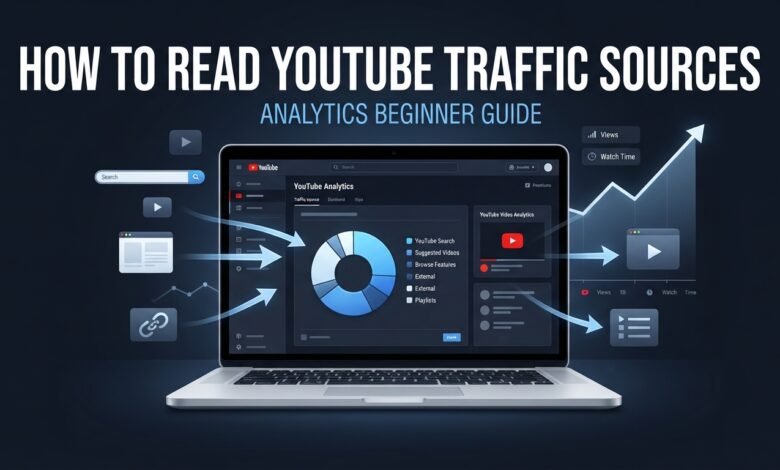
How to Read YouTube Analytics Traffic Sources
If you are growing a YouTube channel, getting views is only part of the picture. You also need to understand where those views are coming from. This is where YouTube Analytics traffic sources can become extremely useful.
Traffic sources show how viewers discovered your videos. They can help you understand whether people are finding your content through YouTube Search, suggested videos, browse features, external websites, playlists, or other sources.
For beginners, these reports can look confusing at first. However, you do not need to understand every analytics report immediately. Learning how to read the main traffic sources can help you make better decisions about topics, titles, thumbnails, and content strategy.
In this guide, you will learn how to read YouTube Analytics traffic sources and how to use this information to improve your future videos.
What Are YouTube Analytics Traffic Sources?
YouTube Analytics traffic sources show how viewers found your content.
For example, someone might discover your video by searching for a question on YouTube. Another viewer might click your video after watching a related video. Someone else may find it through a Google search or a link shared on another website.
YouTube groups these discovery paths into different traffic-source categories.
Common sources include:
- YouTube Search
- Suggested Videos
- Browse Features
- External Sources
- Playlists
- Channel Pages
- Notifications
- Shorts-related sources
- Other YouTube features
The exact reports available can vary depending on the content and channel.
How to Find Traffic Sources in YouTube Analytics
You can access traffic-source information through YouTube Studio.
Open YouTube Studio and select Analytics. From there, look for the Reach section or traffic-source reports associated with your video.
You can also open individual videos and examine their analytics to understand how viewers discovered that specific video.
When analyzing traffic sources, avoid checking only one number. Look at the source alongside views, impressions, watch time, and viewer behavior.
1. YouTube Search
YouTube Search shows viewers who discovered your content through searches on YouTube.
This traffic source can be particularly useful for tutorial, educational, how-to, and problem-solving channels.
For example, suppose you create a video called:
“How to Make a YouTube Thumbnail on Your Phone.”
If viewers search for similar terms and discover your video, some of your traffic may appear under YouTube Search.
A strong search traffic pattern can suggest that viewers are actively looking for information related to your topic.
What to Look For
When you receive YouTube Search traffic, examine:
- Which videos receive search traffic?
- What search terms are associated with those videos?
- Which topics repeatedly attract search viewers?
- Are viewers continuing to watch after clicking?
Use these observations to develop related content rather than simply repeating the same video.
2. Suggested Videos
Suggested Videos traffic comes from recommendations that appear alongside or after other videos.
This can include recommendations on video watch pages.
Suggested traffic can be useful because viewers may discover your content while watching something related.
For example, if you publish a video about YouTube thumbnails, YouTube may recommend it to viewers watching other videos about thumbnails, YouTube SEO, or channel growth.
If one of your videos receives significant suggested traffic, examine its topic and relationship to your other videos.
You could then create additional videos that naturally connect to the same subject.
3. Browse Features
Browse Features generally includes traffic from areas such as the YouTube homepage, subscriptions feed, and other browsing experiences.
A video receiving Browse traffic may be discovered by viewers who are not actively searching for the exact topic.
This makes your title and thumbnail especially important because viewers may encounter your video while browsing.
If your videos receive Browse traffic, look at which topics and packaging approaches appear repeatedly among your stronger-performing videos.
4. External Sources
External traffic comes from sources outside YouTube.
Examples can include:
- Google Search
- Websites
- Blogs
- Social media
- Messaging platforms
- Forums
- Other external pages
Suppose you publish a tutorial and share its link on your website. Viewers who click that link may appear under an external traffic source.
External traffic can help you understand whether your content is reaching people beyond YouTube.
However, external views can behave differently from views generated inside YouTube, so consider watch time and viewer behavior as well.
5. Playlist Traffic
Playlist traffic occurs when viewers discover or watch your videos through playlists.
Playlists can be useful for organizing related videos into a sequence.
For example, a beginner YouTube channel might create a playlist called:
YouTube Growth for Beginners
It could contain videos about:
- Choosing a YouTube niche
- Creating your first video
- Making better thumbnails
- Understanding YouTube Analytics
- Improving audience retention
If viewers watch several related videos through a playlist, this can create a more organized viewing experience.
6. Channel Pages
Channel Page traffic represents viewers who discover videos through a YouTube channel page.
These viewers may already be interested in your content or may have discovered your channel through another video.
A clear channel layout can help visitors understand what your channel is about.
Organize your videos around related topics and use playlists where appropriate so visitors can easily find more content.
7. Notifications
Some viewers discover videos through YouTube notifications.
Notifications can reach subscribers who have enabled relevant notifications for your channel.
Do not worry if notifications are not your largest traffic source. Different channels can have very different traffic patterns.
Instead, look at the overall mix of traffic sources and identify which sources consistently bring useful viewers to your content.
How to Compare Traffic Sources
Do not automatically assume that the traffic source with the highest number of views is the most valuable.
For example:
| Traffic Source | Views | What to Examine |
|---|---|---|
| YouTube Search | 800 | Search topics and viewer retention |
| Suggested Videos | 1,200 | Related videos and audience behavior |
| Browse Features | 1,500 | Titles, thumbnails, and viewer response |
| External | 400 | External websites and watch time |
The numbers above are only an example.
The important point is to compare traffic sources with other performance signals.
Ask:
Which sources bring viewers who actually watch the content?
Use Traffic Sources to Find New Topics
One of the best ways to use traffic-source data is for content planning.
Suppose several of your videos consistently receive YouTube Search traffic.
Look for common themes.
If videos about YouTube thumbnails repeatedly attract search viewers, you could create related topics such as:
- How to improve YouTube thumbnail text
- Best thumbnail size for YouTube
- Common YouTube thumbnail mistakes
- How to make thumbnails on a phone
This creates a connected content strategy based on topics viewers are already discovering.
Do Not Obsess Over One Traffic Source
Beginners sometimes believe that their channel must receive most of its views from one particular source.
That is not necessary.
Different videos can have completely different traffic patterns.
One tutorial may receive mostly Search traffic, while another may receive Suggested or Browse traffic.
The goal is not to force every video into the same traffic category. Instead, learn how your content is being discovered and improve the elements you can control.
Common Traffic Source Mistakes
Avoid these common mistakes when analyzing YouTube traffic sources.
Only Looking at Views
Views are useful, but they do not tell the entire story.
Also examine watch time, retention, engagement, and other relevant metrics.
Ignoring Search Traffic
If your channel creates educational or tutorial content, search traffic can provide useful information about the questions viewers are asking.
Assuming More Traffic Is Always Better
A large number of views is not automatically a sign that viewers found the content valuable. Look at what viewers do after discovering the video.
Changing Your Strategy Too Quickly
One video may receive unusual traffic. Wait for patterns across multiple videos before making major changes.
How to Use Traffic Sources to Improve Your Channel
You can turn your analytics into a simple process:
Step 1: Identify your main traffic sources.
Step 2: Find your best-performing videos.
Step 3: Compare the traffic sources for those videos.
Step 4: Identify common topics and formats.
Step 5: Create related content.
Step 6: Review the new video’s traffic sources.
Step 7: Continue improving based on repeated patterns.
This creates a simple cycle:
Publish → Analyze → Learn → Improve → Publish Again
Final Thoughts
Learning how to read YouTube Analytics traffic sources can help you understand how viewers discover your videos.
YouTube Search can show that people are actively looking for your topics. Suggested Videos can reveal connections between related content. Browse Features can help you understand how viewers respond when your videos appear while browsing, while External sources can show how people discover your content outside YouTube.
Do not focus on one traffic source or one number. Look at the complete picture and compare traffic sources with watch time, audience retention, impressions, and viewer behavior.
Most importantly, use what you learn to create better future videos.
Your traffic-source data is not just a report. It can become a practical tool for understanding your audience and planning your next piece of content.