How to Make YouTube Videos Rank for Multiple Keywords
How to Make YouTube Videos Rank for Multiple Keywords

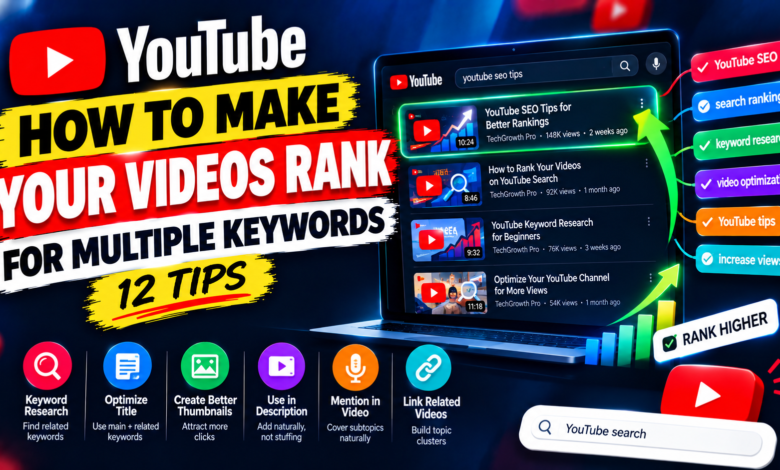
How to Make YouTube Videos Rank for Multiple Keywords: 12 Tips
Creating one YouTube video around a single keyword is simple, but sometimes a video can naturally answer several related searches. When your content covers a topic comprehensively, it may have opportunities to appear for multiple relevant keyword variations.
The key is not to stuff dozens of keywords into your title or description. Instead, you should build one useful video around a central topic and naturally cover related questions, phrases, and subtopics.
In this guide, you’ll learn how to make YouTube videos rank for multiple keywords using topic planning, search intent, related keywords, titles, descriptions, spoken content, and internal content connections.
1. Start With One Main Topic
Before looking for multiple keywords, choose one clear primary topic.
For example, suppose your main topic is:
How to Improve YouTube Search Ranking
You might find related searches such as:
- YouTube search ranking tips
- YouTube SEO tips
- improve YouTube rankings
- rank videos on YouTube
- YouTube search optimization
These phrases are connected to the same subject.
Your video should first satisfy the main search intent. The related keywords should support that central topic rather than take the video in completely different directions.
2. Find Closely Related Keyword Variations
Once you have your primary keyword, identify variations that people might use when searching for the same general information.
Look for differences in:
- Word order
- Singular and plural forms
- Questions
- Beginner phrases
- Problem-based searches
- How-to variations
- Related terminology
For example, a video about YouTube thumbnails might naturally cover:
how to make YouTube thumbnails
YouTube thumbnail tips
how to create better YouTube thumbnails
YouTube thumbnail design tips
These phrases are closely related, making them easier to cover within one useful video.
3. Group Keywords by Search Intent
Not every related keyword belongs in the same video.
Imagine you find these searches:
how to make a YouTube thumbnail
YouTube thumbnail size
best thumbnail design apps
YouTube thumbnail analytics
Although they are all about thumbnails, they may represent different needs.
Group keywords according to what the searcher wants.
A single beginner tutorial might naturally cover the first two, while a separate video could focus on thumbnail analytics or design tools.
The goal is to avoid creating a video that tries to answer unrelated questions.
4. Build Your Video Around Subtopics
After selecting related keywords, turn them into useful sections.
For example, a video targeting several YouTube SEO-related phrases could include:
- What YouTube SEO means
- How to choose a keyword
- How to write the title
- How to optimize the description
- How to use related keywords
- How to improve the thumbnail
- How to check performance
Each section can address a different aspect of the broader topic.
This gives your video depth without forcing keywords unnaturally into the content.
5. Use the Main Keyword in the Title
Your primary keyword should usually have the strongest presence in your title.
For example:
How to Make YouTube Videos Rank for Multiple Keywords
This clearly communicates the video’s central subject.
Don’t try to include every related keyword in the title.
A title such as:
YouTube SEO, Keywords, Ranking, Search, Titles, Tags and Multiple Keywords
looks unnatural and does not give viewers a clear reason to watch.
Use the title to communicate the main topic, while supporting keywords can appear naturally elsewhere.
6. Add Related Keywords to the Description
Your video description gives you space to explain what the video covers.
Write a natural summary and mention relevant subtopics where appropriate.
For example:
“This guide explains how to optimize YouTube videos for multiple related keywords, organize keyword groups, match search intent, improve titles and descriptions, and create content that covers a topic comprehensively.”
Notice that the related concepts appear naturally instead of being listed repeatedly.
Write for the viewer first.
7. Include Related Topics in the Spoken Content
Your actual video should genuinely discuss the subjects associated with the keywords you want to target.
If your keyword group includes:
- YouTube keyword research
- related keywords
- YouTube SEO
- search intent
then your video should actually explain these concepts.
You can naturally say important terminology while teaching the subject.
The goal is not to repeat a keyword a specific number of times. The goal is to create useful content around the topic.
8. Use Questions as Video Sections
Questions can help you cover multiple related searches naturally.
For example, a video about YouTube keyword optimization could include sections such as:
How do I find related YouTube keywords?
How many keywords should I target?
Should I put keywords in the title?
Can one video rank for different searches?
These questions can make the video more comprehensive while giving viewers clear sections to follow.
If your video is long enough, chapters can also make these sections easier to navigate.
9. Don’t Force Unrelated Keywords
One of the biggest mistakes is trying to make a video rank for keywords that don’t actually match its content.
Suppose your video is about YouTube thumbnails. Adding unrelated phrases such as:
YouTube monetization
YouTube live streaming
YouTube channel verification
doesn’t make the content more relevant.
Choose keywords that describe the same topic or closely related subtopics.
Relevance is more important than the number of keywords you collect.
10. Create a Strong Thumbnail and Title Combination
Multiple-keyword optimization should not make you forget about viewers.
When your video appears in search results, people still need a reason to click.
Create a clear title and thumbnail combination.
For example:
Title:
How to Make YouTube Videos Rank for Multiple Keywords: 12 Tips
Thumbnail:
RANK FOR MORE KEYWORDS
The title explains the subject while the thumbnail provides a short visual message.
Keep the presentation simple and accurate.
11. Connect Related Videos on Your Channel
Sometimes the best way to cover a related keyword is not to force it into the same video.
If a subtopic deserves a full explanation, create a separate video.
For example:
Video 1: How to Find YouTube Keywords
Video 2: How to Make YouTube Videos Rank for Multiple Keywords
Video 3: How to Improve YouTube Search Ranking
These videos can support one another through playlists, cards, end screens, descriptions, and other relevant features.
This creates a broader content system around the same subject.
12. Use Analytics to Refine Your Keyword Strategy
After publishing your video, review your available YouTube Analytics data.
Look for information about:
- Search traffic
- Impressions
- Click-through rate
- Viewer retention
- Traffic sources
- Video performance
You may discover that viewers are finding your video through a search phrase you didn’t originally target.
That can provide useful information for future videos.
For example, if a video about YouTube SEO begins attracting viewers interested in a specific subtopic, you could create a dedicated video covering that subject in greater detail.
Common Multiple-Keyword Mistakes
Targeting too many keywords
A large keyword list does not automatically make a better video.
Using unrelated phrases
Keywords should have a genuine connection to your content.
Keyword stuffing
Repeating phrases excessively can make your title and description difficult to read.
Ignoring search intent
Two keywords can look similar while representing different viewer needs.
Creating shallow content
Trying to cover too many topics can result in a video that doesn’t properly answer any of them.
Final Thoughts
Learning how to make YouTube videos rank for multiple keywords is mainly about creating comprehensive content around one connected topic.
Start with one primary keyword, identify closely related searches, group them by intent, and turn the most relevant ideas into useful sections of your video. Use your main keyword in the title and naturally include related terminology in the description and spoken content.
Don’t try to target every keyword you find. If a topic is too different or deserves a detailed explanation, create a separate video and connect the content through your channel.
The best approach is to focus on one clear topic, several closely related searches, and genuinely useful information. This gives your video a logical structure while creating opportunities to be discovered through different relevant searches.