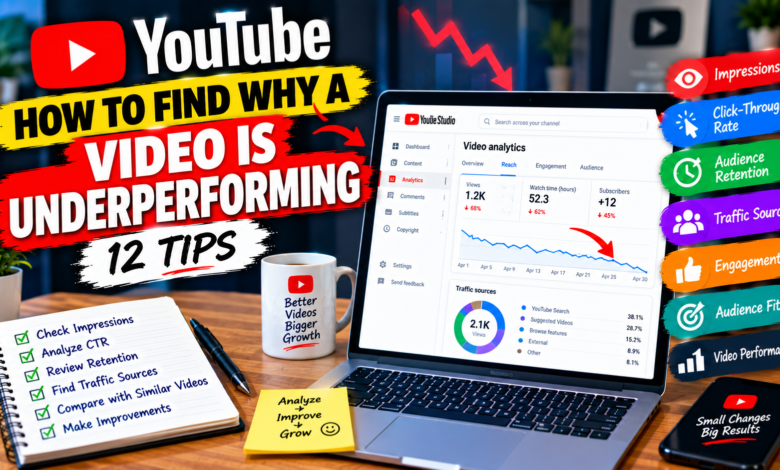
How to Find Why a YouTube Video Is Underperforming: 12 Tips
How to Find Why a YouTube Video Is Underperforming: 12 Tips

How to Find Why a YouTube Video Is Underperforming: 12 Tips
Sometimes you publish a YouTube video that you believe will perform well, but the results are disappointing. The video may receive fewer views than expected, get low impressions, have a weak click-through rate, or lose viewers quickly.
Instead of immediately deleting the video or changing everything, you should first find out why the YouTube video is underperforming.
YouTube Analytics can help you identify where the problem may be. By checking impressions, click-through rate, audience retention, traffic sources, engagement, and other performance signals, you can make more informed improvements.
In this guide, you will learn how to find why a YouTube video is underperforming and what you can do about it.
1. Start by Comparing the Video With Your Other Videos
The first step is to determine whether the video is actually underperforming compared with your normal results.
Do not judge a video only by its raw number of views.
For example, if your typical videos receive around 500 views and one receives 100 views after a reasonable period, that may indicate weaker performance.
Compare similar videos based on:
- Topic
- Video format
- Audience
- Publishing period
- Views
- Watch time
- Impressions
- Engagement
Comparing similar content gives you a better starting point.
2. Check YouTube Impressions
Impressions can help you understand whether YouTube is showing your video to potential viewers.
If your video has very few impressions, the problem may be related to the topic, audience match, search demand, content positioning, or the video’s early performance.
However, low impressions do not automatically mean that your video is bad.
A new or small channel may naturally receive fewer opportunities than an established channel.
Look at the overall situation instead of focusing on one number.
3. Check Click-Through Rate
If your video receives many impressions but relatively few clicks, examine the title and thumbnail.
Your thumbnail and title are often the first things viewers see when deciding whether to watch.
Ask yourself:
- Is the topic immediately clear?
- Does the title communicate a specific benefit?
- Is the thumbnail easy to understand?
- Is the text readable on a small screen?
- Does the packaging match the actual video?
Avoid misleading clickbait. The goal is to make the right viewers interested in clicking.
4. Examine Audience Retention
If people click your video but leave quickly, audience retention can provide important clues.
Look for major drops near the beginning of the video.
A sharp early decline may indicate that:
- The introduction is too long.
- The video does not quickly deliver what the title promised.
- The opening is confusing.
- The pacing is too slow.
- Viewers expected something different.
For future videos, try getting to the main point faster and making the value clear early.
5. Look at Average View Duration
Average view duration shows how much time viewers spend watching your video on average.
A low average view duration can suggest that viewers are not staying long enough to consume much of the content.
However, the ideal duration depends on the video topic and format.
A short tutorial and a long educational guide should not necessarily have the same viewing pattern.
Use this metric together with audience retention rather than judging it alone.
6. Check Traffic Sources
Traffic sources can reveal where your viewers are discovering the video.
Depending on your video, traffic may come from:
- YouTube Search
- Suggested Videos
- Browse features
- External websites
- Playlists
- Other YouTube surfaces
Suppose you expected your video to receive search traffic but almost none is coming from Search.
You may need to review the topic, search intent, title, description, and overall relevance.
If a video receives strong Suggested traffic but weak Search traffic, that tells you something different about how viewers are finding it.
7. Review the Search Terms
If your video receives traffic from YouTube Search, examine the search terms that are bringing viewers to it.
Ask whether the video actually matches those searches.
For example, if people are searching for:
“How to make YouTube thumbnails on phone”
but your video mainly discusses desktop thumbnail design, viewers may not find it as useful as expected.
Understanding search intent can help you create content that better matches what viewers want.
8. Check Whether the Topic Matches Your Audience
Sometimes the problem is not the thumbnail, title, or editing. The topic itself may not be a strong match for your audience.
Imagine a channel that normally publishes beginner YouTube tutorials suddenly publishes a highly advanced video about professional video production.
Even if the video is well made, existing viewers may not be interested.
Review your recent videos and ask:
“Would my current audience actually want this topic?”
A strong audience-topic match can make it easier to attract relevant viewers.
9. Look at Engagement
Likes, comments, shares, and other forms of interaction can provide additional context.
A video with low views but strong engagement may have a valuable topic that simply has not reached enough viewers yet.
On the other hand, a video with views but very little interaction may indicate that viewers are consuming the content without feeling a strong reason to participate.
Look for patterns across several videos instead of using engagement as the only measurement.
10. Check the Video’s Opening
Even when the topic is good and the thumbnail attracts clicks, a weak opening can hurt performance.
Avoid spending the first 30 seconds on information that viewers do not need.
Instead, quickly explain:
- What the video is about
- What problem you will solve
- What viewers can expect
- Why the information matters
For example:
“In this video, I’ll show you three reasons your YouTube videos may be getting impressions but not clicks, plus what you can change.”
This gives viewers a clear reason to continue.
11. Check Whether the Video Is Too Broad
Broad topics can sometimes make it difficult to satisfy a specific audience.
Compare:
“YouTube SEO Tips”
with:
“YouTube SEO Tips for a Channel With Under 100 Subscribers”
The second topic clearly targets a particular audience and problem.
If your video is underperforming, consider whether the topic could have been more specific.
Specific content can make your value proposition clearer.
12. Give the Video Time and Test Improvements
Not every underperforming video needs to be changed immediately.
Sometimes a video may gain traffic later through Search, Suggested Videos, or other sources.
Before making major changes, collect enough information to identify a real pattern.
If the evidence suggests a problem, consider testing improvements such as:
- A clearer title
- A stronger thumbnail
- Better introduction
- More specific topic
- Improved explanation
- Better internal connections to related videos
Make changes thoughtfully rather than changing everything at the same time.
A Simple YouTube Video Diagnosis Process
You can use this simple process whenever a video performs below expectations:
Step 1: Check views
Is the video significantly below your normal performance?
Step 2: Check impressions
Is YouTube giving the video enough exposure?
Step 3: Check CTR
Are viewers clicking when they see it?
Step 4: Check retention
Are viewers staying after clicking?
Step 5: Check traffic sources
Where are viewers coming from?
Step 6: Check engagement
Are viewers interacting with the content?
Step 7: Check audience fit
Does the topic match what your viewers want?
Step 8: Make one or two improvements
Then monitor the results.
This approach is much more useful than simply assuming that the algorithm is the problem.
Common Mistakes When Diagnosing an Underperforming Video
Avoid these mistakes:
Deleting the video too quickly: A slow start does not always mean permanent failure.
Changing everything at once: You may not know which change made a difference.
Focusing only on views: Other metrics can explain why views are low.
Blaming the algorithm immediately: First examine your own data.
Copying competitors: Their audience and channel history may be completely different.
Ignoring the topic: A well-edited video can still struggle if the topic has weak audience demand.
Final Thoughts
Learning how to find why a YouTube video is underperforming starts with looking at the right data instead of guessing.
Check impressions, click-through rate, audience retention, average view duration, traffic sources, engagement, and audience fit. Then compare the video with similar content on your own channel.
The goal is not to find one magical metric that explains everything. Instead, look at the complete picture and identify where viewers may be losing interest or where the video is failing to reach the right audience.
With a consistent review process, every underperforming video can provide useful information for making your next video better.