How to Compare YouTube Videos in Analytics: 12 Tips
How to Compare YouTube Videos in Analytics: 12 Tips

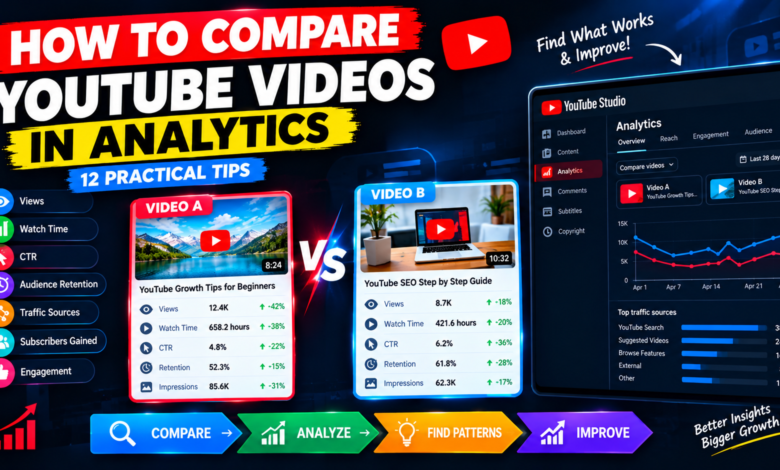
How to Compare YouTube Videos in Analytics: 12 Practical Tips
Understanding why some YouTube videos perform better than others can help you build a smarter content strategy. One video may receive thousands of views, while another covering a similar topic struggles to attract an audience. Instead of guessing what went wrong, you can use YouTube Analytics to identify patterns and make better decisions.
Learning how to compare YouTube videos in Analytics allows you to evaluate views, watch time, impressions, click-through rate, audience retention, and traffic sources. These metrics help you understand which topics attract viewers, what keeps them watching, and where your content needs improvement.
In this guide, you will learn 12 practical ways to compare YouTube videos and use the results to improve your channel.
1. Open YouTube Studio Analytics
Start by opening YouTube Studio and selecting Analytics from the left-hand menu. You can review channel-level performance or open an individual video’s Analytics page.
To compare specific videos, use the Advanced Mode or detailed reporting options available in YouTube Studio. Select the videos and metrics you want to examine, where supported.
Choose videos with similar topics or formats whenever possible. Comparing two similar tutorials can reveal more useful patterns than comparing a short entertainment clip with a long educational video.
Before analyzing the numbers, decide what you want to learn. For example, you might want to discover which thumbnail attracts more clicks or which introduction keeps viewers watching longer.
2. Compare Total Views
Views are one of the easiest metrics to compare, but they do not tell the entire story.
A video with more views may have benefited from a larger audience, a popular topic, or more time since publication. A newer video may still be building momentum.
For a fair comparison, examine videos over similar periods after publication when possible.
Ask yourself:
- Which video attracted more views?
- How quickly did its views increase?
- Did one video receive an unusual traffic boost?
- Are the topics equally relevant to your audience?
Use view counts as a starting point rather than the only measure of success.
3. Analyze Watch Time
Watch time measures the total time viewers spend watching your content. It can help you understand how much viewing activity each video generates.
A video with fewer views may produce substantial watch time if viewers watch for longer. Another video may attract many clicks but generate less total viewing time.
Compare watch time alongside views and average view duration.
If one video consistently generates more watch time, examine its structure, usefulness, pacing, and ability to hold attention.
Remember that watch time alone does not prove why a video performed better. Consider the topic, length, audience, and traffic sources before drawing conclusions.
4. Compare Impressions
Impressions show how often YouTube displays your thumbnail in eligible locations on the platform.
If one video receives substantially more impressions, it may be reaching a larger potential audience.
Possible explanations include stronger topic interest, different traffic sources, seasonal demand, or broader distribution.
Compare impressions between videos covering similar subjects. Then check whether the video with more impressions also attracts more clicks.
High impressions with relatively few clicks may indicate that the title or thumbnail deserves further review. Low impressions may require investigating topic relevance and discoverability instead.
5. Check Click-Through Rate
Click-through rate, or CTR, measures how often viewers click after seeing an eligible impression.
Comparing CTR can help you evaluate how effectively your video title and thumbnail encourage viewers to click.
For example, two tutorials might receive similar impressions, but one attracts a higher percentage of clicks.
Review the differences between their titles, thumbnails, topics, and audience appeal.
Do not assume that a higher CTR always means a video is better. CTR varies by traffic source, audience, and how broadly a video is shown. A video reaching a wider audience may have a lower CTR while attracting more total views.
Always interpret this metric alongside impressions and watch time.
6. Examine Audience Retention
Audience retention shows how well a video holds viewers’ attention throughout its duration.
Compare the retention graphs of videos with similar topics and lengths. Look for differences near the introduction, major explanations, demonstrations, and ending.
If viewers leave quickly in one video, its opening may be too slow or may not match the promise of the title.
If another video maintains attention for longer, study its pacing, examples, storytelling, and structure.
Use these findings to improve future uploads. Avoid assuming that every drop in retention indicates a mistake; viewers may naturally leave after finding the information they need.
7. Compare Average View Duration
Average view duration tells you approximately how long viewers watch a video on average.
This metric can help you evaluate whether your content holds attention, but video length matters.
For example, a five-minute tutorial and a twenty-minute tutorial should not automatically be judged by the same average view duration.
Compare videos with similar purposes and lengths. Also review the audience retention percentage when available.
If viewers watch a larger proportion of one video, examine whether it delivers information more efficiently, uses clearer examples, or removes unnecessary sections.
8. Review Traffic Sources
Traffic sources reveal where viewers discover your videos.
Common sources include YouTube Search, Browse features, Suggested videos, playlists, external websites, and other YouTube surfaces.
Compare these sources to understand how each video attracts an audience.
For example, one tutorial may perform well in Search because it answers a specific question. Another may receive more Suggested video traffic because it connects with related content.
Use these patterns to plan future topics and improve how related videos connect.
Do not expect every video to have identical traffic sources. Different topics naturally attract viewers in different ways.
9. Compare Subscribers Gained
If your goal is to grow your channel, check how many subscribers each video generates.
A video with moderate views may attract more subscribers than a viral video because it reaches people who are genuinely interested in your channel’s subject.
Review which topics bring in relevant viewers and encourage them to explore more content.
Consider whether the video clearly communicates your channel’s value and gives viewers a reason to return.
Subscribers gained should be interpreted alongside views, audience fit, and the video’s purpose rather than treated as an isolated score.
10. Compare Engagement Metrics
Likes, comments, and shares provide additional information about how viewers respond to your videos.
Compare engagement between similar uploads to discover which topics encourage discussion or sharing.
Read the comments, not just the totals. Viewers may explain what helped them, what confused them, or what they want to learn next.
Use these observations to improve your content and develop future video ideas.
Remember that engagement levels vary by topic. A practical tutorial may receive fewer comments than a debate-focused video while still serving its audience effectively.
11. Look for Patterns Across Similar Videos
One comparison can be misleading, so look for patterns across several uploads.
Group videos by topic, format, audience, or purpose. Then examine which characteristics repeatedly appear in stronger-performing videos.
For example, you may discover that specific how-to tutorials attract more search traffic, while case studies generate longer viewing sessions.
Record your findings in a simple spreadsheet with columns for topic, views, CTR, watch time, retention, and traffic sources.
Use the patterns to guide your content calendar rather than assuming that one successful video guarantees the same results every time.
12. Turn Your Findings Into an Action Plan
The final step is to use your comparison to make practical improvements.
If a video has a weaker CTR than similar uploads, review its title and thumbnail. If viewers leave early, improve the introduction. If search traffic is limited, reconsider the topic and whether the video answers the intended question.
Choose one or two improvements at a time and monitor the results.
Avoid changing every element simultaneously because you may not know which adjustment made a difference.
Continue comparing new uploads with relevant older videos. Over time, this process can help you understand your audience and make more informed decisions.
Final Thoughts
Learning how to compare YouTube videos in Analytics helps you move beyond view counts and understand why different videos perform differently.
Compare views, watch time, impressions, CTR, retention, traffic sources, subscribers, and engagement. Choose similar videos, account for their publication dates, and look for repeated patterns instead of drawing conclusions from a single metric.
Most importantly, turn your findings into specific improvements. With consistent analysis, you can discover what your audience values, strengthen your content strategy, and make better decisions for your YouTube channel.